



Best Website Builder
I test every website builder so you don’t have to. These are my rankings of the best website builders for 2026.
Our work is supported by affiliate commissions. Learn More
By Juhil Mendpara | Updated Nov 5 2026
Lovable can turn a short written description into a website in a few minutes. Setting up a Squarespace website usually takes an afternoon or so, depending on how much content you have ready. That speed makes Lovable look like the obvious choice, until you start updating the site.
Think about a painter with a portfolio site. Launch day happens once. After that, every few weeks they add new pieces, post the dates of an upcoming exhibition, and maybe write a blog post about how a series came together. That ongoing work is where the two tools split apart.
For most portfolios, blogs, and small business sites, we recommend Squarespace despite all the AI hype. Lovable is the better tool when your site needs custom interactive features or is really an app.
Use Squarespace for a portfolio, blog, or small business site you'll update often. Use Lovable when the site needs custom tools or visitors need to log in and save their own data.
It builds a full site in minutes and pretty well at that.
Routine changes happen using Fluid Engine, Squarespace's drag-and-drop editor. In Lovable, anything beyond text edits goes through an AI chat request.
Squarespace is a website builder. Lovable is an AI app builder that many people also use to make websites.
Squarespace gives you templates, a drag-and-drop editor, hosting, and website tools like galleries, a blog, forms, ecommerce, etc. You never have to touch code.
Lovable works like a chat. You describe what you want, and it writes the code, shows you a preview, and even helps you put it online. It can also add user accounts and a database, which is why founders use it to build early versions of software products. A typical website rarely needs either.
| Squarespace | Lovable | Winner | |
|---|---|---|---|
| First draft | Start from a template | Full site from a description in minutes | Lovable |
| Routine edits | Click and drag | Free inline text edits; most other changes by AI request | Squarespace |
| Website features | Gallery, events, blog, forms and store built in; email and scheduling as add-ons but still part of the ecosystem | You ask Lovable to build each one or embed from third-parties | Squarespace |
| Design | Designer-made templates | Generic by default; very flexible with your own brand and references | Squarespace |
| SEO settings | SEO fields on every page | SEO audit with fixes by request | Squarespace |
| Price | $19/month annual, $25 monthly | About $21/month annual, $25 monthly | Squarespace (narrowly) |
| Code ownership | No code export | Export the code, host anywhere (a bit technical) | Lovable |
Lovable gets you to a complete-looking first draft much faster. Getting to a site you can actually publish takes longer than it looks. I have
Describe a painter’s site (a homepage with a featured piece, a gallery, an about page, upcoming exhibitions, and a contact form), and Lovable builds it in a few minutes, with a polished layout and placeholder copy. Attach your own photos and describe the style you want, and it gets closer.

Homepage of a painter's website I built with Lovable
The catch is that a draft can look finished and still need work. In one of our tests, Lovable generated a contact form that looked finished but didn’t send and had no field validation. The navigation links didn’t scroll to their sections, the mobile menu didn’t open, and the address didn’t match throughout the website.
Tip: Before you launch any AI-built site, click every link and test every form yourself.
A Squarespace portfolio template
On Squarespace, you pick a portfolio template and replace the sample artwork and text with your own, or you start from blank or Blueprint AI. It’s slower to start, but galleries, forms, and mobile menus work from day one because they’re built into the platform.
Squarespace has its own AI tools, including Blueprint AI, which builds a starter site from a few questions. In our experience, though, Blueprint AI has been subpar. You’ll get better results starting with a designer template.
In Lovable, AI does the planning, writing, and building for you. Squarespace has AI tools too, but they are subpar. Its strength is a complete website feature set and an editor that gives you direct, hands-on control over every page.
So the fastest approach is to let a strong AI like Claude or ChatGPT handle the planning and writing: mapping out your pages, drafting your About page and artist statement, and suggesting colors and fonts. Then build the site yourself in Squarespace’s editor, starting from a template. Our guide on how to use Claude to build a Squarespace website walks you through it step by step.
For our sample painter site, that means asking Claude for a site plan and a short bio, picking a portfolio template, pasting in the words, and dropping in the artwork. It still takes an afternoon, but you finish the planning and most of the content creation before you open the editor to replicate everything.
For a first draft to show someone today, Lovable is faster. However, budget time to test and fix it before it goes live.
Squarespace is easier to edit. This matters most because you’ll edit a website far more often than you build it.
The two work in opposite ways. In Squarespace, you change the page yourself. In Lovable, you mostly tell its AI what to change, and it rewrites the code for you.

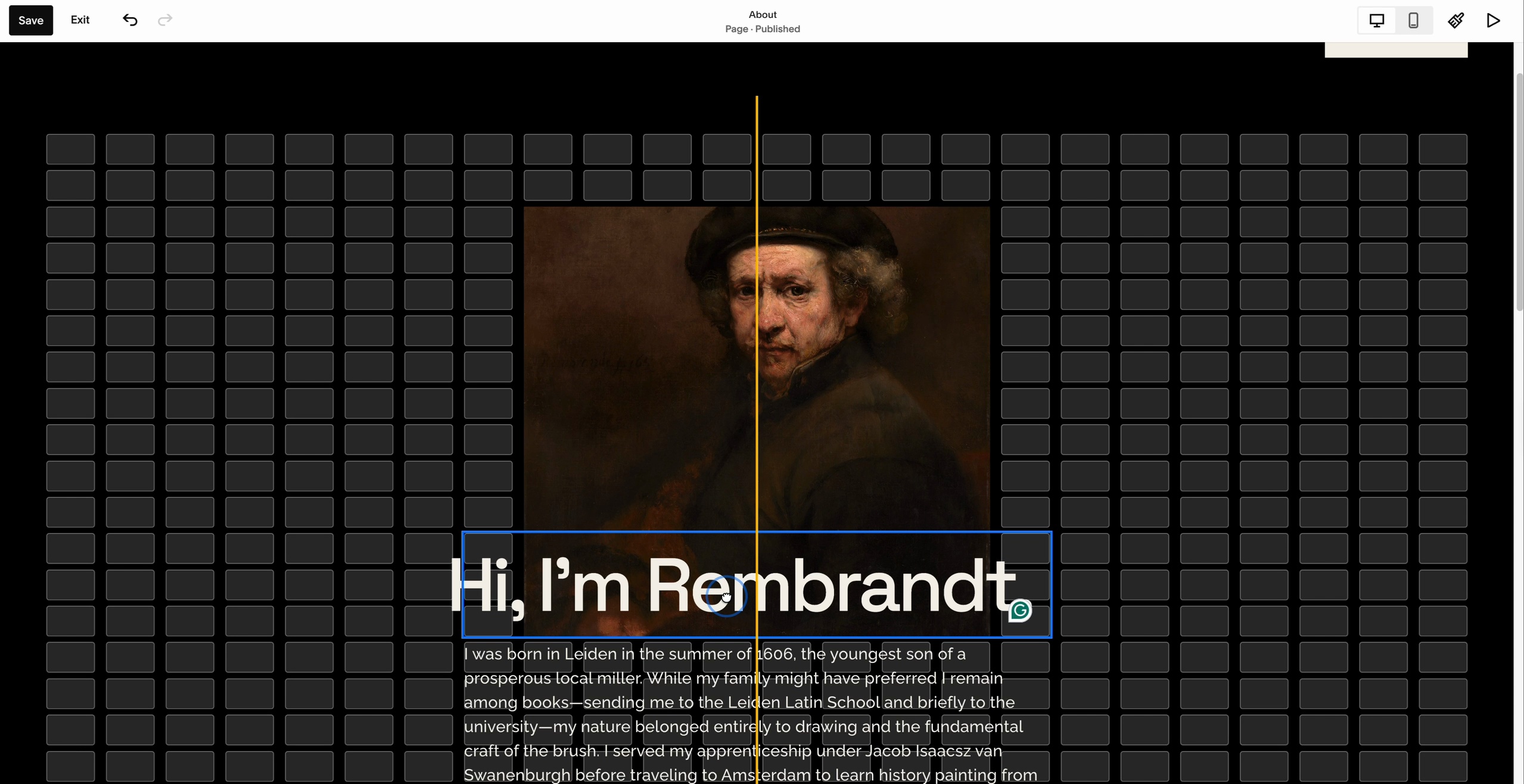
Using Squarespace's drag-and-drop editor to make changes visually.
You open the page you want to change and click Edit. From there, everything is direct:
You see changes as you work, and it goes live when you click Save. You can make as many edits as you want, with nothing extra to pay.
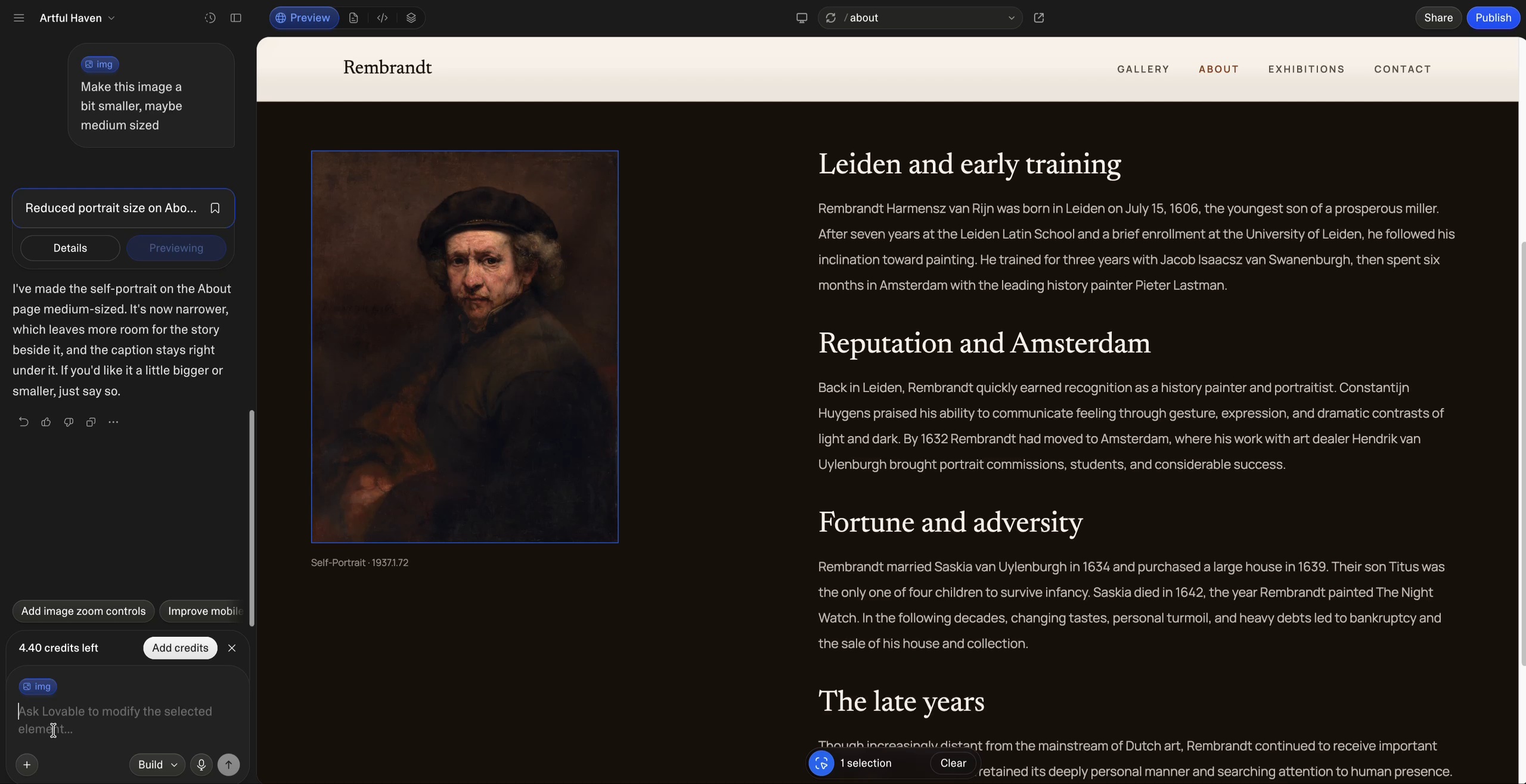
Editing in Lovable: Changing the size of an image and then its position. Much less intuitive, slow, and costly than Squarespace.
Lovable shows a live preview of your site next to a chat box. There are three ways to change it:
The last two use credits, though a small change usually costs under one. You check each result in the preview, and if it’s wrong, you ask again or roll back to an earlier version. When you’re happy, you publish the update to push it to your live site.
For most sites, cost isn’t the problem. The problem is that you’re describing a change instead of making it, which is tedious and may require you to reiterate multiple times.
Say it’s a month after launch. The painter has finished three new pieces, an exhibition date has moved, and they want the exhibitions section higher on the homepage.
In Squarespace, they drop the new images into the gallery, type the titles, click the date to change it, and drag the exhibitions section up. Then they click Save.
In Lovable, the date is an inline text edit, so that part is quick. The rest goes through requests. They select the gallery and ask Lovable to add the three new pieces (attaching the images), then select the exhibitions section and ask Lovable to move it up. Each result needs checking before they publish.
Requests can also take a few rounds. Say the painter thinks a featured painting is too wide. They ask Lovable to make it narrower. It comes back too narrow, so they ask for a little wider. Now it sits off-center, so they ask again. That’s three or four rounds for a change that’s one drag of an image’s edge in Squarespace.
You can see glimpses of this distinction in the videos above.
In Squarespace, you make routine updates yourself, see them as you go, and save. In Lovable, anything beyond text is a request you have to check.
Squarespace comes with the tools a website needs. With Lovable, you ask for each one, then test it.
| Feature | Squarespace | Lovable |
|---|---|---|
| Portfolio galleries | Built in; add images by dragging them in | Ask Lovable to build one |
| Events (like exhibitions) | Built in, with dates and location | Ask Lovable to build one |
| Blog | Built in, with drafts, scheduling, and categories | No built-in blog; prompt each post, or connect a separate CMS like Sanity |
| Contact forms | Built in; submissions emailed to you | Emails you only after you connect an email service and verify your domain’s DNS records |
| Online store (like selling prints) | Built in, with products, inventory and shipping | Through an integration: connect Shopify (a separate Shopify subscription runs your products, inventory and orders) or build a simpler checkout with Stripe |
| Email newsletters | Squarespace Email Campaigns (separate subscription) | Connect another service |
| Appointments | Acuity Scheduling (separate subscription) | Build one or embed another tool |
| Logins | Member areas for paid or private content | Custom accounts and databases for personal data and tools |
The bigger difference is what you get for updating the site later. Squarespace’s gallery, events and blog each come with their own editing screen. Lovable generates the pages, but the tools to manage them are up to you. For the painter’s blog, that means prompting each post, connecting a separate CMS like Sanity, or asking Lovable to build a custom publishing screen. All three work. Each one is extra setup, and the last two are things you’ll have to test and maintain yourself.
The tools a portfolio or small business site needs are ready to use, with an editing screen for each.
Squarespace gives you a better-looking site out of the box. Lovable gives you more design freedom, but most Lovable sites don’t use it.
Squarespace’s templates are made by designers for specific kinds of sites, from restaurants and online stores to consultants, photographers, and nonprofits. We think they’re the best templates of any DIY website builder, especially in typography, spacing, and how they frame images.
A template is a starting point, not a cage. You can change the fonts, colors, and layout, and two sites on the same template rarely look alike once the owner’s photos and words are in. What you skip is the hardest part of design: deciding what goes where.
Lovable doesn’t use templates. It designs each site from your description. That sounds like it should make every site unique. In practice, it does the opposite.
I’ve looked through nearly 1,000 published Lovable sites to build our galleries of Lovable websites, Lovable portfolios, and Lovable Shopify stores. Almost all of them were instantly recognizable as AI-made.
The same thing shows up across AI builders, not just Lovable. For our AI prompt-to-website gallery, we built a site from the same prompt across 20+ AI website builders. Many of them look pretty much the same.
Note: Why do AI websites all look the same?
Three reasons, and they stack:
- Same AI models: Lovable’s builder runs on Anthropic’s Claude models, and many AI builders run on the same handful of models from Anthropic and OpenAI (the companies behind Claude and ChatGPT). Different products, same designer underneath.
- The most common choices: An AI model learns from millions of existing websites and leans toward the most common choices it has seen. Ask for “a modern website” and you get the average modern website: a centered headline, a badge above it, three feature cards and a row of stats.
- Same code libraries: AI builders tend to reach for the same popular code libraries for buttons, cards and layouts, so even the small details match.
Your prompt is the only thing that pushes against all three. A short, vague prompt gets the defaults. Your own photos, brand colors, fonts and a few reference sites are what make the result look like yours.
That matters more than it sounds. In my experience, the AI look can put visitors off and make a business feel less considered.
The exceptions show what it takes. Jukebox Burgers, a Montreal-area diner, doesn’t look AI-made at all: a neon diner sign behind the burgers, a red-and-white checkerboard band, and tall condensed lettering that feels like a 1950s menu board. The diner has been around for over 15 years, and the site leans on that existing brand. AfterImage Film Festival does something similar with a near-black page, a grainy film-textured logo, and a retro italic serif.
Both started with a strong identity and real assets, and getting from there to a finished design usually takes several rounds of requests. Without that, you get the default look.
A designer-made template looks professional from day one. Lovable offers more design freedom, but without a strong brand to work from, it tends to look like every other AI-built site.
Both can rank on Google. The difference is who does the work. Squarespace handles SEO for you, with a settings box for everything that matters. Lovable gives you more control over the code, but more of the setup is on you.
| Squarespace | Lovable | |
|---|---|---|
| Can search engines read it? | Yes. Every page is sent as finished HTML, with nothing for you to manage. | Yes on new projects. Older projects only show full pages to verified search engines. |
| SEO settings | Title, description, URL, and sharing image on every page, plus automatic sitemaps and redirects. Plus, a separate SEO/AI visibility tab to oversee everything SEO-related throughout the website. | An SEO tab that audits your site and offers fixes; no settings box on each page. |
| Publishing content | Built-in blog with SEO fields, categories, and scheduled posts. | No built-in blog; add a CMS, a custom publishing screen, or prompt each post. |
| Technical control | Limited, but hard to break. | Full access to the code, which also means more room for mistakes. |
| Best for | Business sites, portfolios and blogs that want SEO handled for them. | Custom sites and apps with someone to manage the technical side. |
This used to be Lovable’s biggest SEO problem. Older Lovable sites send visitors a mostly empty page, and the browser fills in the content with JavaScript. Google can usually handle that, but many other tools, including the crawlers behind AI search and the bots that build link previews, may see very little. Lovable works around it by serving a pre-rendered copy of each page to verified search engines and social preview bots, but anything outside that list still gets the empty page.
Since May 13, 2026, new Lovable projects use a framework called TanStack Start, which sends every page as finished HTML from the server. Every visitor and crawler gets the same complete page. Older projects can upgrade, but it isn’t automatic: you start it yourself, and Lovable says most upgrades cost 10 to 35 credits, depending on the size of the site.
Squarespace pages have always been sent as finished HTML, so there’s nothing to check or upgrade.
Every Squarespace page has its own SEO settings: the title Google shows, the description under it, the page URL and the image shown when someone shares the link. Squarespace also creates your sitemap and lets you set up redirects when you rename a page. Moreover, there’s a seperate SEO/AI Visibility tab to oversee the SEO of the whole site.
Page level SEO settings on Squarespace
SEO/AI visibility tab on Squarespace
Lovable has an SEO tab that audits your site (missing descriptions, missing image text, slow pages and more) and offers one-click fixes. Because you own the code, you can control anything, from page markup to how URLs are structured. But there’s no simple settings box on each page, so most changes mean asking Lovable or editing the code yourself.
Squarespace’s blog is ready on day one, with its own URL, SEO fields, categories, and scheduled publishing for each post.
Lovable has no built-in blog, so that publishing setup has to be added first, through a CMS, a custom screen, or prompts. For a site that publishes often, Squarespace makes search-focused content easier to create and manage.
Neither platform will rank a site on its own. What you publish, how the site is organized, and who links to it still decide that. Squarespace just removes the technical hurdles.
For most business sites and blogs, Squarespace is the more straightforward SEO choice. Lovable can work for a custom, focused site, but you take on more of the content management and technical setup.
The two cost about the same. The difference is how predictable the bill is.
| Squarespace | Lovable | |
|---|---|---|
| Free option | 14-day free trial | Free plan: 5 credits a day (up to 30 a month), Lovable badge, lovable.app address |
| Billed monthly | Starts at $25/month | Starts at $25/month |
| Billed annually | Starts at $19/month | Starts at about $21/month |
| What’s included | Hosting, templates, website tools; free domain for the first year on annual plans | 100 credits a month plus 5 a day, hosting, custom domain |
| What changes the bill | Only your plan (and any add-ons) | Your plan, plus top-ups if you use up your credits |
You pick a plan, and that’s the bill. Squarespace’s price stays the same no matter how much you edit, and most website features are included. Email campaigns, scheduling, and member areas are paid add-ons. See our Squarespace pricing guide to pick a plan.
Lovable charges by usage. Building, edits, and hosting all draw from one balance of credits, and each request to its AI costs credits based on how much work it takes. Lovable’s own examples:
| Request | Credits used |
|---|---|
| Make the button gray | 0.50 |
| Remove the footer | 0.90 |
| Add login and authentication | 1.20 |
| Build a landing page with images | 2.00 |
Some things don’t cost credits. Inline text edits are free (up to 100 a day), and hosting draws on a monthly Cloud allowance before touching your balance. Pro also adds 5 free credits every day on top of the monthly 100. Those daily credits are used first, but they expire at the end of each day, so you can’t save them up.
Here’s what that means for the example painter’s month of updates. Changing the exhibition date is a free text edit. Adding three new pieces and moving the exhibitions section are two requests, likely somewhere in the range of Lovable’s examples above. Resizing the featured painting took three or four rounds, at roughly half a credit each. That’s a handful of credits for the month, which fits inside Pro’s daily allowance with room to spare.
Where costs grow is bigger work: a new page, a redesign, or a request that goes wrong and needs fixing. If you run out, Pro top-ups cost $15 for 50 credits. Unused monthly credits roll over (on monthly billing, they expire two months after they’re issued). If your balance hits zero, your pages stay live, but backend features like logins and saved form entries pause.
A couple of dollars cheaper on annual billing, and the price never depends on usage.
Lovable is faster on day one, but you build a site once and update it for years.
Still unsure? Write down the first five things you’d change on your site after launch. If they’re new artwork, exhibition dates, a blog post, or a new page, go with Squarespace. If they include visitors logging in to save their own data or use a custom tool, you’re building an app, and Lovable fits.