




Best Website Builder
I test every website builder so you don’t have to. These are my rankings of the best website builders for 2026.
Our work is supported by affiliate commissions. Learn More
By Juhil Mendpara | Updated Sep 2 2026
Hostinger is the best budget website builder of the 50+ platforms we’ve tested. And it’s not close. If you want a professional website fast and don’t want to spend much to get there, it’s the first place I’d send you.
But “best budget website builder” and “best website builder” are two different things, and this review is essentially about the gap between them.
Hostinger Website Builder — now branded as Hostinger AI Builder — is a drag-and-drop site builder that bundles hosting, a free first-year domain, email, SSL, AI tools, and integrated email marketing into one subscription starting at $2.99/month.
It started as Zyro in 2019, which Hostinger absorbed and rebranded in 2023. Since then, it’s been folded into their newer AI Builder, which now offers two distinct build modes:
This review focuses on manual mode (or the “Hostinger Website Builder,” as it was called just last month).
Side Note: Hostinger is best known as a website hosting platform, but for simplicity, I’ll use the name “Hostinger” to refer to its website builder here.

Let’s start with what usually catches the eye: the introductory pricing and the incredible value it brings.
You can create up to 3 websites at just $2.99/month! And the pricing goes even lower on some occasions, as it did during Black Friday week.
That price makes it one of the cheapest website builders, and it’s an unmatched value for the features you get.
I must emphasize the “introductory” part here, as once the selected plan period is over, the renewal rate becomes significantly higher. But that doesn’t mean I can’t appreciate what that tiny price tag can mean to many just getting started.

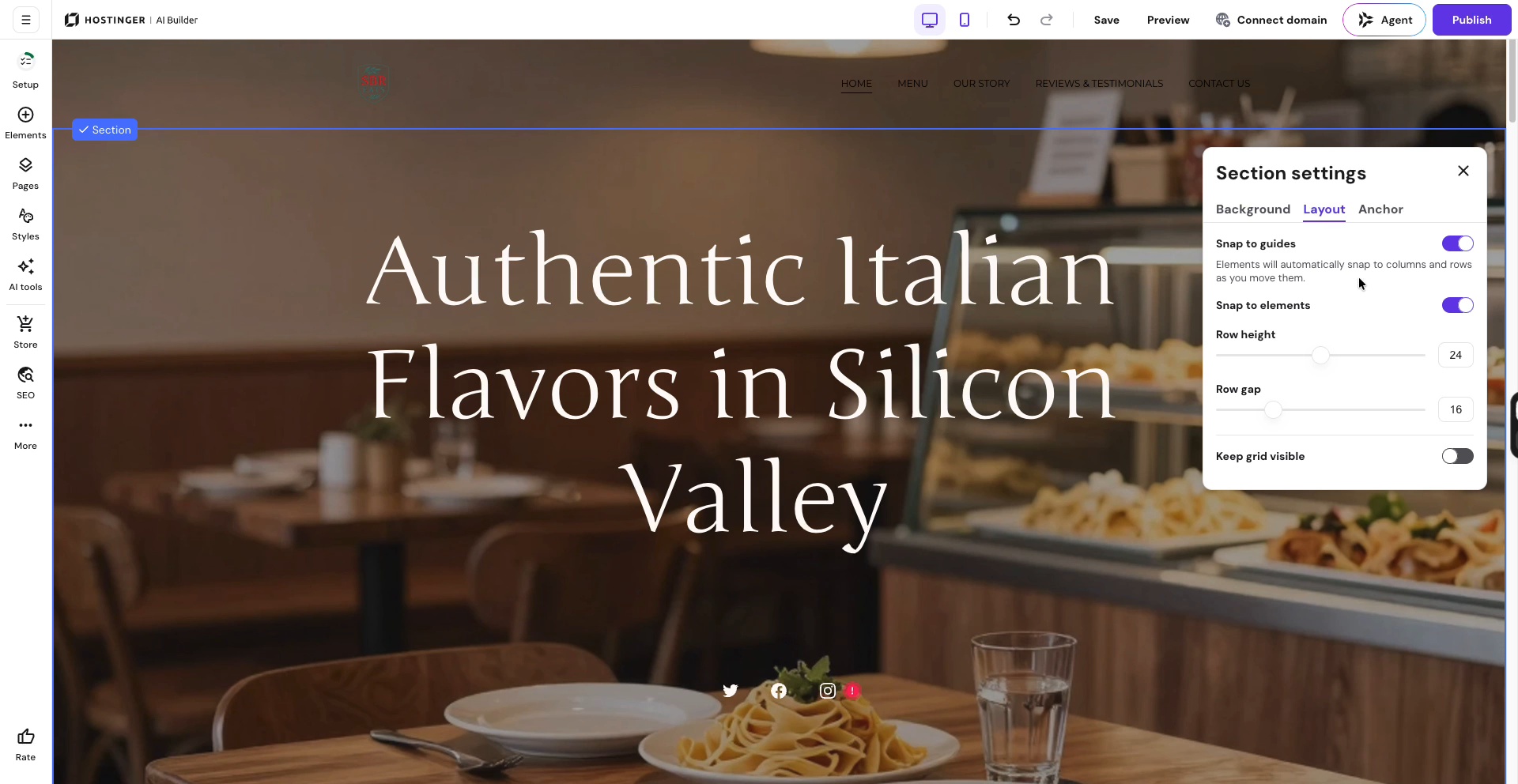
Drag-and-drop of Hostinger’s page editor
Hostinger’s drag-and-drop editor is a standout in the budget website builder category. It is comparable to the top two names in DIY website building (Squarespace and Wix), and I mean that quite literally.
The editor works in two modes:
Hostinger leaned into AI earlier and harder than most competitors. And in my recent tests, it has produced quite good results.
Hostinger’s AI Website Builder can generate a starting website from a short description. It creates the pages, layout, copy, images, and basic visual direction. The result is not ready to publish without editing, but it is usually much better than starting from a blank screen or even from templates. It gives beginners a clear structure and relevant placeholders for visual direction.
Besides, with its Business plan, you get many other AI features that align well with your website creation goals. You can use Hostinger’s AI tools for generating images, website sections, website pages, blog posts, product descriptions, logos, and SEO content.
Here’s an example of a simple prompt delivering a good output with Hostinger’s “AI Page Generator” tool:
Hostinger covers the essentials most beginners look for. None of them are best-in-class, but they’re all included, they all work, and you don’t have to go shopping for add-ons to make your site functional.
Here’s what you get out of the box:
You’ll hit ceilings on some of these if you grow. But for the audience Hostinger is built for — first-time website owners, small businesses, side projects — the essentials are all here, and they all work.
From its Zyro days to Hostinger Website Builder, and now AI Builder, Hostinger is constantly evolving and fast. You’ll notice it if you scroll through the Hostinger AI Builder Roadmap.
Hostinger’s introductory rates are aggressive; the intro price is the sales pitch! The renewal is what you’ll live with, and it’s roughly 4x higher.
Premium renews at $10.99/month and Unlimited at $16.99/month. That’s still cheaper than Squarespace or Wix at renewal, but the jump is real: if you commit to 48 months at $2.99/month to lock in the lowest rate and then let it auto-renew without paying attention, your next bill will surprise you.
Not a dealbreaker, just something to plan for.
Tip: Set a calendar reminder a month before your term ends, so the renewal becomes a decision rather than a surprise. Also, keep a screenshot of the pricing page showing the renewal rate to remember what you committed to.
If you decide to leave Hostinger a year or two in, you’re mostly rebuilding your site somewhere else. There’s a partial WordPress export for your content, but the design, layouts, and store data don’t come with it.
This is true of every closed builder. Squarespace and Wix have the same problem. But the renewal price gives you more reason to consider leaving Hostinger than most competitors, which makes the lock-in sting a bit more.
Factor this in before you commit to a long term.
Hostinger is built for small, simple sites, and it shows once you start pushing it:
None of these matters for the audience Hostinger targets. But they’re worth knowing before you build something you might outgrow.
Hostinger’s pricing model is simple: pick a plan, pick a term length, pay upfront. The longer the term, the lower the monthly rate.
| Premium | Unlimited | Cloud Startup | |
|---|---|---|---|
| Intro price (48-month term) | $2.99/mo | $3.99/mo | $7.99/mo |
| Renewal price | $10.99/mo | $16.99/mo | $25.99/mo |
| Websites | 3 | Unlimited | Unlimited |
| Storage | 20 GB SSD | 50 GB NVMe | 100 GB NVMe |
| Backups | Weekly | Daily | Daily + on-demand |
| Free domain (first year) | Yes | Yes | Yes |
| Mailboxes per website | 2 | Unlimited | Unlimited |
| Email marketing (Reach) | Yes | Yes, free for year 1 | Yes, free for year 1 |
| Integrated ecommerce | Yes | Yes | Yes |
| AI Builder credits (agentic mode) | 5 | 15 | 15 |
Three things worth knowing before checkout:
Hostinger is my top pick for budget websites, but it isn’t the right answer for every situation. Here’s where I’d send you instead:
For a full breakdown, see Hostinger Website Builder alternatives.
Yes. Arguably more so than any other builder I’ve tested. The AI-generated first draft, drag-and-drop editor, and bundled domain, hosting, and email remove the setup steps that usually trip first-timers up. You can have a real site online in an afternoon.
Manual mode if you’re building a website: portfolio, blog, small store, brochure site. Agentic mode is a different product for building web apps — dashboards, client portals, custom tools — and requires separate credits.
Sort of. The $2.99 rate is real, but only if you pay for 48 months upfront. After that, it renews at $10.99/month. The renewal price is shown at checkout, so no hidden fees, but a lot of people don't read it.
Hostinger is cheaper and easier to start with than either. Wix has more flexibility and a much bigger app market. Squarespace has better templates, deeper blogging, stronger ecommerce, and overall better aesthetics and intuitiveness.